
FIELD GUIDEMORTAL SHELL II
Mortal Shell II Save File Location
C:\Users\[your_username]\AppData\Local\MortalShell2\Saved\SaveGamesClose the game and make a separate copy before attempting recovery.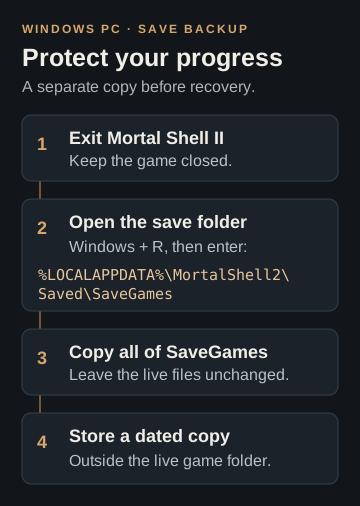
Updated: . Sources checked: . Scope: Windows PC; researched from post-launch support information, not independently tested in-game. The source does not specify one build for this directory.
Open the Windows save folder
- Exit Mortal Shell II.
- Press Windows + R to open Run.
- Enter
%LOCALAPPDATA%\MortalShell2\Saved\SaveGames, then press Enter.
The shortcut uses your current Windows account. If the folder is missing, recheck the account and game name before proceeding; creating an empty folder will not restore saves. The directory is reported in MikkelFromGames' launch-support thread.
Make a separate backup
- With the game closed, copy the entire SaveGames folder.
- Paste the copy outside the live game directory, preferably on another drive.
- Label that copy with the date and keep older backups separately. Leave the live files unchanged.
Our recommendation is to keep this independent copy even when cloud synchronization is enabled. A sync status is not proof that a particular restore point is available.
If loading your save crashes
After backing up, check for Recover Save on the loading screen. The support-thread author suggests this for loading crashes. Recovery is not guaranteed; the recovered progress may differ from your latest save, so check it before continuing. For other symptoms, use our PC crash troubleshooting guide.
Source: Global Release Bug Reports & Known Issues, by u/MikkelFromGames, marked Official News on r/MortalShell. The page shows a relative publication date; October 2 is our source-check date.